Events
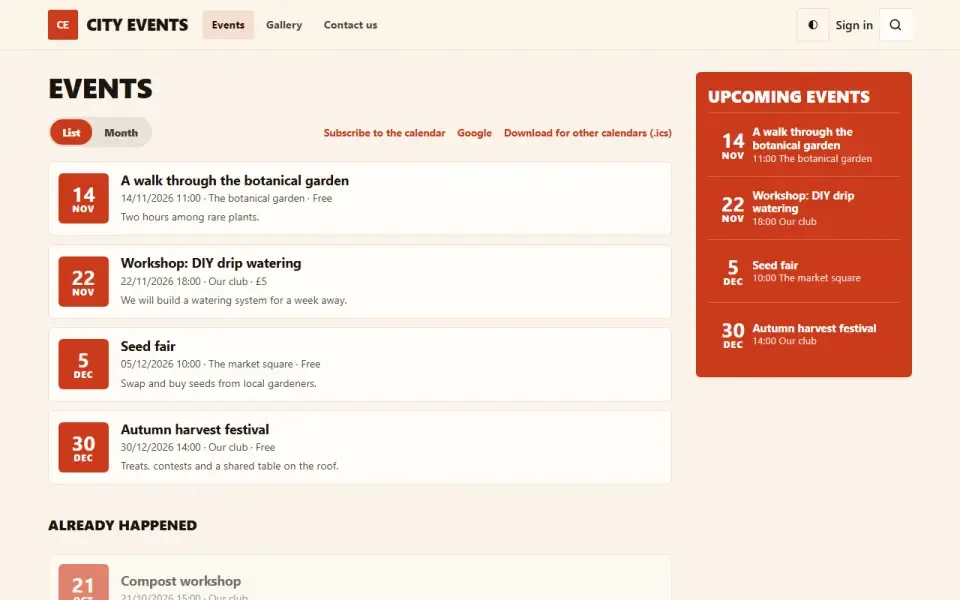
The site's event listing: upcoming and past events, an event page with time, venue, price and a ticket link, a home page block, an .ics file for calendars and schema.org markup for search engines.
Features
- Event listing: upcoming events, with past ones below, 20 per page.
- Event page: description, a cover from the media library and a “when, where, how much” card — time, venue, address, price, a link to tickets or registration.
- The “Add to calendar” button serves an .ics file that phones, Google Calendar and Outlook can open.
- An all-day event is shown without times and goes into the calendar as a date.
- An event counts as past by its end time, not its start: a session from 10:00 to 18:00 is still on at noon.
- schema.org Event markup: search engines can show the date and venue right in the results.
- An event can be shown in one site language or in all of them; drafts are supported.
- Events are found by the site search, and upcoming ones are included in the sitemap.
Configuration
Admin panel → Settings → Events, “Events on the site” group:- How many to show on the home page — 3 by default. If nothing is coming up, there is no home page block at all.
- Show past events — on by default. When off, the page shows only what is still ahead.
Permissions
- See events.
- Add, edit and delete events.
On the site
- /events — the event listing, an “Events” item in the site menu.
- /events/slug — an event page.
- /events/slug/calendar.ics — the calendar file.
- The “Coming up” block on the home page.
Installation and removal
Installation creates the events table. Removing the module with data deletes the table along with all events.Left out on purpose
- An embedded map: that means a third-party script on every page and tracking consent for the sake of one rectangle. Instead there is a “Show on the map” link to OpenStreetMap.
- An empty “no events yet” block on the home page.
Slik installerer du
Du har den allerede. Panelet → Moduler → slå på.
Versjonshistorikk
1.0.0
- Афиша: ближайшие и прошедшие события, страница события с временем, местом, ценой и ссылкой на билеты
- Файл .ics «В календарь» для телефона, Google Календаря и Outlook
- События на весь день и окончание по времени конца, а не начала
- Блок «Ближайшие события» на главную, число карточек — в настройках
- Разметка schema.org Event и страницы событий в карте сайта
- Позже в этой версии: события ищутся поиском по сайту; подпись месяца в блоке стала крупнее
Spørsmål og funn hører hjemme på forumet: seksjonen Moduler