Released on 29.09.2026.
Until now, the mail password and service keys sat in the settings as plain text, and an update that broke the site had to be rolled back by hand. From 0.9.8 the engine takes care of both.
Secrets under encryption #
The mail password and the keys for the captcha and other services are stored in the database encrypted with your site's own key. Even if a copy of the database ends up in the wrong hands, the secrets in it can't be read. In the change log they show as “[hidden]”. Important: don't change the site key, or you will have to enter the secrets again.Your password once more before anything risky #
Granting or removing admin rights, changing someone else's password or email, or two-step sign-in: these actions now ask for your password again. If someone sits down at your unlocked computer, they can't hand themselves power over the site. There is also a new role, “Admin assistant”: it manages content but doesn't touch the settings.An update that rolls itself back #
After “Download and install”, the panel checks the site by itself. If the site doesn't answer, the old files come back without you doing anything. The recovery key is shown only once, so save it. Where: System → Updates.Who can see an entry #
News and pages now have a “Who can see it” field: everyone, only signed-in visitors, or roles from the one you choose and up. That's how you make private sections for customers or staff.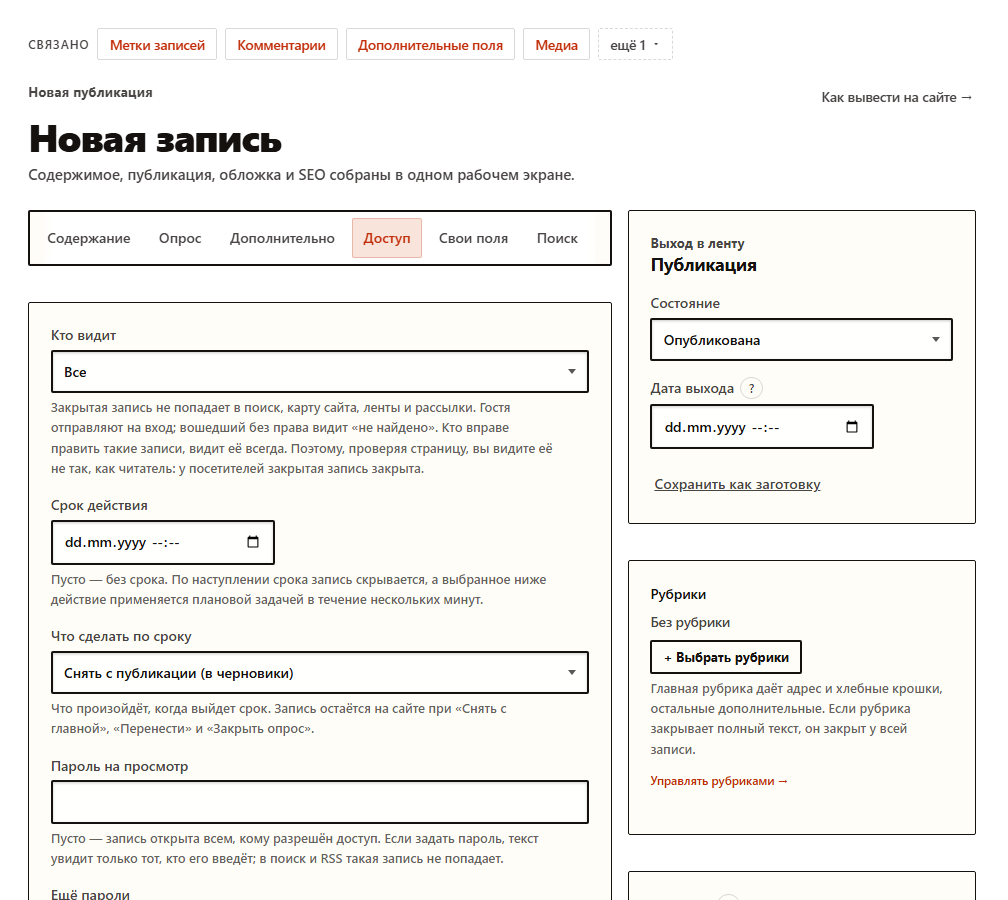
And more #
- The setup wizard explains how to fix a red requirement and checks the database server version up front.
- “Diagnostics → Protection”: the “Check now” button asks your site whether service folders are open to outsiders.
- Encrypted database backups to external storage (S3 or WebDAV), off by default.
- Import of entries from a WXR export file and from CSV.
- Alerts to the owner in messengers, an email when the site goes down, a log of sent emails, a broken-link check.
- Site search forgives typos.
- Interface labels can be edited right in the panel.
How to update #
This release has migrations. Replace the files and press “Back up and apply” on the System → Updates page. The first update to this version still has no automatic rollback: the protection starts with 0.9.8.Links #
- Discussion on the forum (in Russian).
- All NEX1ON releases.
No one has commented yet. Be the first.