Released on 12.10.2026.
A fresh engine is a blank sheet after installation, and the first hours go into figuring out what to switch on. In 0.9.9 the setup wizard starts with the question “what is your site for?” and builds the site around your answer.
A site that fits you from the first minute #
The first step is language and country, then you pick from 22 kinds of site: shop, forum, cinema, courses, real estate, tours, jobs and more. Each kind has its own theme and, if you like, demo pages. The wizard takes the site name and mark from your domain and writes the search-engine description to match the kind you chose. If the installation breaks off, the wizard picks up from the saved step.Themes install just like modules #
Themes come from our server, the same as modules: signed only, with a progress bar, and the previous theme folder is saved as a backup. An installed theme has an “Apply with demo pages” button: modules and samples for your kind of site in one click, with a way to undo. Where to find it now: System → Add-on catalogue → Themes and Appearance → Themes.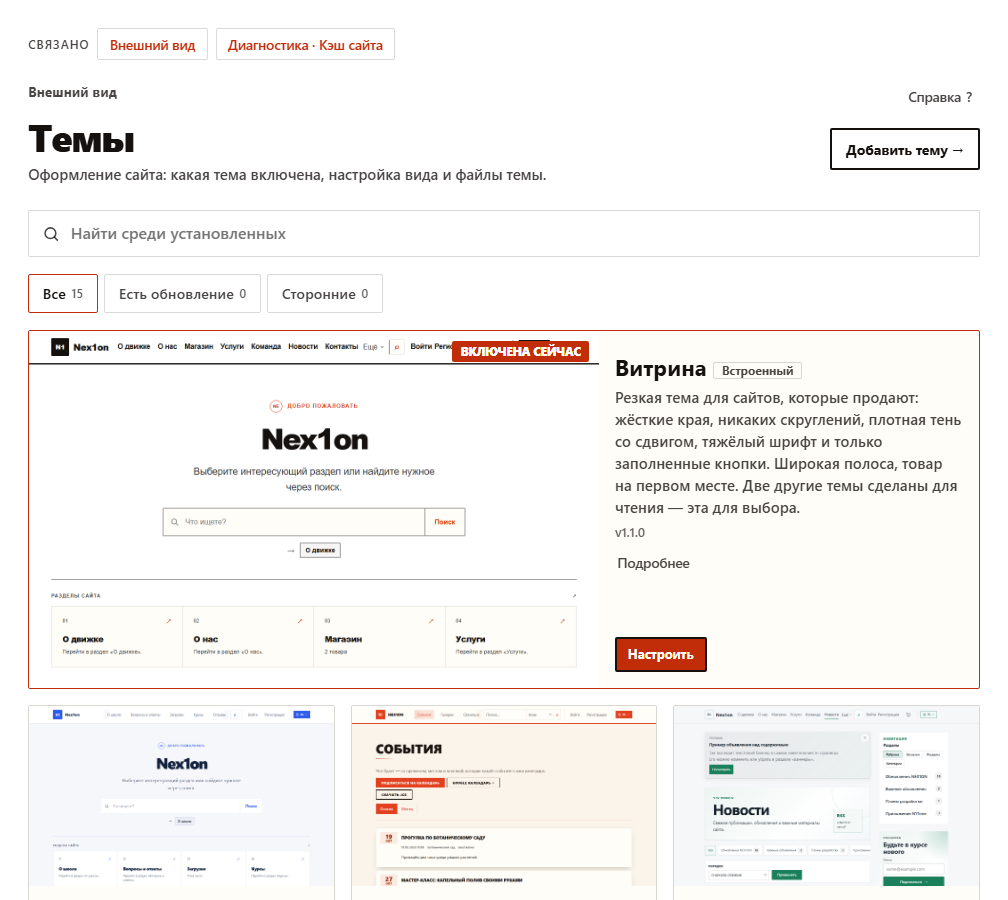
Updates in steps, with checks #
Before “Update”, the panel shows what's new, what the requirements are and which engine files you've edited yourself. The update itself runs in short steps with a progress bar, re-checks the archive signature before replacing files and can bring the old files back. If you've edited engine files, “Update anyway” first packs your edits into an archive.A broken theme doesn't take the site down #
If the active theme keeps throwing errors, the site switches to a fallback theme by itself, and you get an email and a banner in the panel. Visitors see a working site, not a white screen.Licence in plain view #
System → Updates now has a “Licence” block: status, key entry, check. The free version works with visible limits, and a key lifts them.And more #
- Custom sections: a “Map” view, a “Date range” field, “from and to” filters, a form on the entry page (a job application, a tour booking), a “File” field in forms and application stages.
- New themes: “Academy”, “Community”, “Cinema Hall”, “Business”, “Posters”, “Studio”.
- On phones: wizard steps shown as “Step N of M”, compact add-on cards.
How to update #
There are migrations. Replace the files and press “Back up and apply” on the System → Updates page.Links #
- Release page — what's new, archive size and the SHA-256 fingerprint.
- Discussion on the forum (in Russian).
- All NEX1ON releases.
No one has commented yet. Be the first.