Custom sections
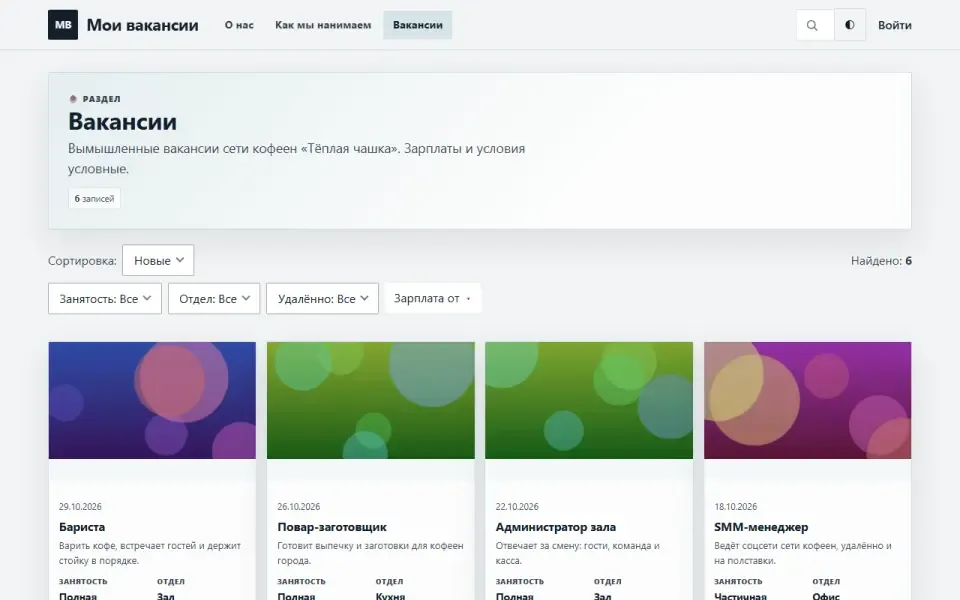
A section builder: the site owner sets up «Vacancies», «Projects», «Sites» and the like with their own fields. Each section gets its own database table, a place in the admin panel, an address and a site menu item.

Features
- A section is created in the admin panel without a developer, and it gets a dedicated database table rather than a shared «key — value» table.
- Eleven field kinds: line of text, several lines, whole number, number with a fraction, yes / no, date, date and time, one of a list, image from the media library, link, email.
- Field options: required, «Show to visitors», «Show on list card», «Use as filter» (for lists, yes / no and dates).
- List layout on the site: cards, list or table. Search and filters on the section page are switched on with a checkbox.
- A section can appear on the home page as its own block, showing the 1 to 12 latest entries.
- Each entry has a short description, text, SEO fields, translations, version history and the bin. Entries are included in site search and the sitemap.
- People. Actors, directors, authors: a person has their own page (/r/persons/name) with a filmography, roles from a closed list, linking to records of any section right in the record editor, and a “Director / Cast” block on a record. A photo only from the media library and with a source caption; drafts and the trash are not visible on the site; “Report a mistake” goes to the common list of reports.
- Collections. Lists of records from any section, put together by hand (“Best of 2024”, “For the family”): an order and a note for every record, its own page /r/collections/name, an “In collections” block on a record and a “Collection” showcase for the home page. Only published records are visible in a collection.
- “Popular people” showcase. A row of person cards by the number of published records they take part in (or newest, or A–Z); the people page has an “A–Z / popular” switch. No visitor is tracked.
Settings
Each section is configured on its own page: Custom sections → Manage sections. The «Fields» tab is there too. Clearing the «Show on the site» checkbox makes a section internal: it is visible only in the admin panel.Permissions
- View section entries — see sections in the admin panel.
- Create entries.
- Edit entries.
- Delete entries — move them to the bin.
- Set up sections and fields — create, change and delete sections and their fields.
On the site
A section lives at /r/section-address, an entry at /r/section-address/entry-address. Every public section adds itself to the site menu. On an entry page, the sidebar shows a «Details» block with the field values. A section with «Show this section on the home page» checked gets its own block on the home page.Installation and removal
Installation creates the content_types and content_fields tables; a section's own table (ct_name) is created when the section is set up. Deleting a section asks you to type its machine name, because its table with all entries goes with it. Removing the module with its data drops the tables of all sections, the definition tables, and the module's permissions and settings.Deliberately left out
- A field's kind and name cannot be changed after creation: changing the kind means changing the column type, and yes / no data cannot be turned into a date. If you need a different field, create a new one and remove the old one once the data has been moved.
- Required fields are checked in the form, not in the database — otherwise such a field could not be added to a section that already has entries.
Jak zainstalować
Już go masz. Panel → Moduły → włącz.
Historia wersji
1.2.0
- Вид списка раздела на сайте: карточками, списком или таблицей
- Поиск и фильтры на странице раздела; поле можно отметить «Использовать как фильтр»
- Блок раздела на главной с числом записей от 1 до 12
- У полей появились отметки «Показывать посетителю» и «Показывать на карточке»
- У записей — короткое описание, SEO-поля и запрет индексации
- Массовые действия над записями: опубликовать, в черновик, в корзину
- Внутри раздела в панели — вкладки: записи, поля, раздел
1.1.0
- Многоязычность: язык у записи и связь с оригиналом во всех разделах, недостающие переводы видны в разделе «Переводы»
- История правок записей с возвратом к версии
- Удалённые записи видны в общей корзине, их можно вернуть или убрать насовсем
- Медиатека показывает, в каких записях разделов используется файл
- Под записями могут стоять комментарии
- Поиск по сайту ищет и в тексте записей, а не только в заголовках
- Проверка имён полей и список видов полей стали общими для всего движка
1.0.0
- Владелец сайта сам заводит разделы и задаёт им поля, без правки кода
- Отдельная таблица под каждый раздел, одиннадцать видов полей
- Пункт в панели, адрес и место в меню сайта у каждого раздела
- Имена полей проверяются по белому списку символов и списку занятых слов
- Удаление раздела требует набрать его машинное имя
Pytania i spostrzeżenia — na forum: dział Moduły