Newsletter
A subscription form as a site block, email confirmation, one-click unsubscribe and newsletters sent out by the queue in batches, so a large list does not freeze the site.
Features
- The subscription form is a block in the sidebar or under an article. By default it asks only for an email address.
- A subscription becomes active after confirmation via the link in the email. Unsubscribing is one link in every newsletter, with no sign-in and no questions.
- The form gives the same response for any address, so an outsider cannot find out whether someone else is subscribed. Bots are filtered out by a honeypot field, a time check and a limit of three attempts in ten minutes.
- Newsletters: draft, test send to yourself, audience by language, copy to a new draft. The markup is the same as in news.
- The queue sends the newsletter in batches. Each email is assembled at the moment of sending, so someone who unsubscribes in the meantime will not receive it.
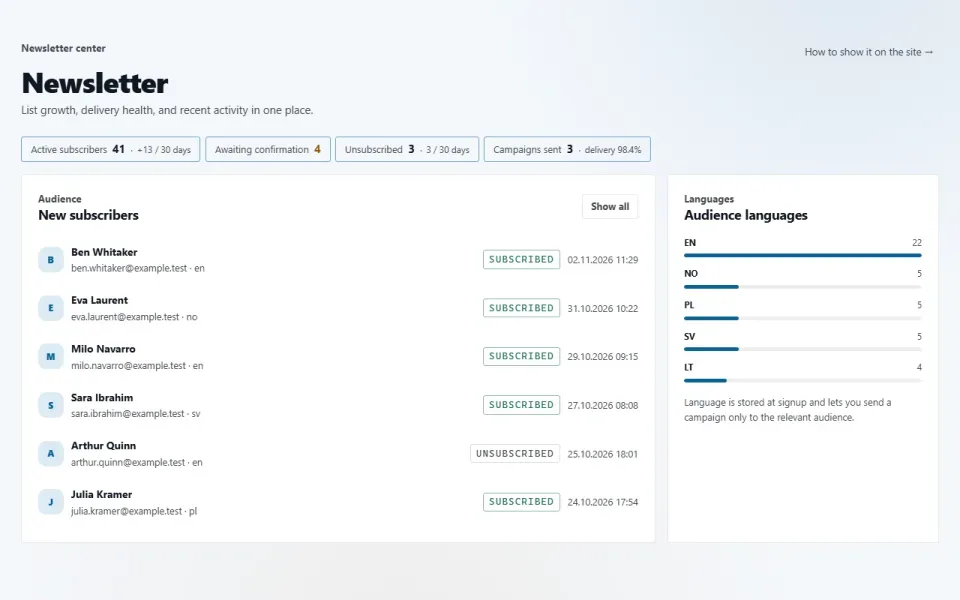
- Overview: list growth, unsubscribes, delivery rate, subscribers by language. A list with filters and CSV export.
Configuration
«Newsletter» → «Settings»:- «Subscription form»: Text above the subscribe form, Ask for a name (off), Note under the form.
- «Delivery»: Letters per batch — one batch goes out without delay, the next one a minute later; 50 by default.
- «List hygiene»: Keep unconfirmed addresses, days — 30 by default.
Permissions
- See subscribers — on installation: administrator, editor, moderator.
- Write and send letters — administrator only.
On the site
The «Newsletter» block, in the sidebar by default; its place is changed in «Appearance → Home & blocks». Links from emails: /subscribe/confirm/… and /subscribe/leave/….Installation and removal
Tables subscribers and newsletters. Subscribers and newsletters go to the shared bin. An unsubscribed person is not deleted, so that a repeat subscription does not wipe out their request. Removing the module with its data erases both tables along with the subscriber list.Jak zainstalować
Już go masz. Panel → Moduły → włącz.
Historia wersji
1.2.0
- Новая страница «Обзор»: рост базы за неделю и месяц, подтверждения и отписки за месяц, доля доставленных писем, подписчики по языкам, свежие подписчики и выпуски
- При подписке запоминается страница, с которой человек подписался; язык и источник попали в выгрузку CSV
- Выпуск можно адресовать подписчикам одного языка; число получателей считается по выбранной аудитории
- Выпуск можно скопировать в новый черновик
- Фильтры: подписчики по языку и периоду (7, 30, 90 дней), выпуски по состоянию, языку и теме
- Новые настройки: «Спрашивать имя» и «Хранить неподтверждённые, дней» — старые неподтверждённые адреса убирает общая уборка движка
- Настройки разложены по группам «Форма подписки», «Отправка», «Чистота базы»; раздел переехал в группу меню «Продвижение»
- Пустой список подписчиков подсказывает, где включить форму подписки
1.0.0
- Форма подписки блоком: место на сайте выбирает владелец
- Подтверждение подписки письмом, отписка одной ссылкой из любого выпуска без входа
- Одинаковый ответ формы для любого адреса, поле-приманка и ограничение частоты
- Выпуски в разметке движка: черновик, тестовое письмо себе, рассылка очередью порциями (настройка «Писем за раз»)
- Список подписчиков с выгрузкой, подписчики и выпуски в общей корзине
- Карточки на обзоре панели: подписчики и не подтвердившие подписку
Pytania i spostrzeżenia — na forum: dział Moduły