Welcome block
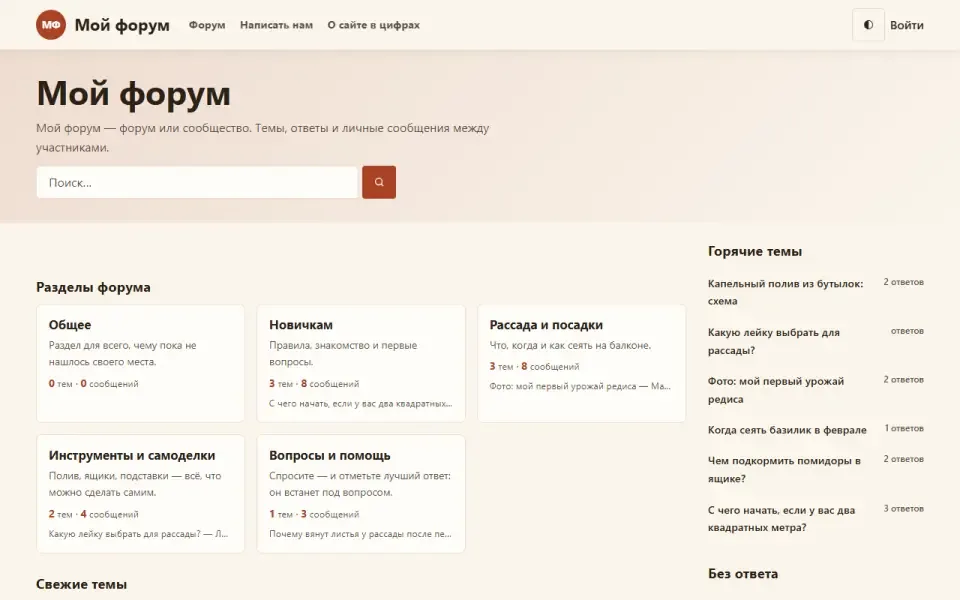
The first block on the home page: headline, main button, search right in the block, section cards and pictures. Everything is configurable; turn the module off and the home page starts straight with other modules' blocks.
Features
- Shows a welcome as the first block of the home page: a line above the headline, the headline, text and the main button.
- A search field right in the block: visitors type the query at once instead of landing on an empty search page.
- A sign-in button for guests; signed-in users do not see it. The block itself can be shown to everyone or to guests only.
- Up to four section cards under the welcome. By default they come from the site's sections and are filled in straight away, no setup needed; you can write your own instead.
- An illustration next to the text, or a background picture across the whole block with adjustable dimming.
- If the headline and text are not set, the site name and tagline from the general settings are used; if the button is not set, the first menu item is used.
Settings
In the admin panel: «Settings», section «Welcome block». The fields are grouped:- Who sees it — «Show the block»: to everyone or to guests only.
- Words — «Title», «Text under the headline», «Line above the headline».
- Actions — «Main button label», «Where the button leads», «Search inside the block», «Offer guests to sign in».
- Looks — «Quick links to sections» and «How many sections to show» (2 to 8, links are taken from the site menu), «Site initials badge».
- Section cards — «Show the cards», «Where the cards come from»: the site's sections or your own. For your own, each of the four has a title, text and address; a card with an empty title is not shown.
- Pictures — «Welcome illustration», «Background picture», «Background dimming, %» (0 to 90, default 55). Pictures are chosen from the media library.
Permissions
The module has no permissions of its own. Settings can be changed by anyone with access to the «Settings» page.On the site
The «Home page welcome» block in the home page area, first in order. The module has no addresses or menu items of its own.Installation and removal
No tables: the module stores only its settings, and they are removed on uninstall.Så installerar du
Du har den redan. Panelen → Moduler → aktivera.
Versionshistorik
1.0.0
- Приветствие на главной вынесено из шаблона темы в отдельный модуль: его можно выключить, и главная начнётся сразу с блоков других модулей
- Поле поиска прямо в блоке вместо кнопки, ведущей на пустую страницу поиска
- Выбор, кому показывать блок: всем или только гостям
- Свои заголовок, текст и надпись сверху; пустые поля берут имя и подзаголовок сайта
- Главная кнопка с настраиваемыми подписью и адресом, кнопка входа для гостей
- Быстрые ссылки на разделы из меню сайта с выбором их числа, отключаемый значок с буквами названия
Frågor och upptäckter tas upp på forumet: kategorin Moduler