Bookings
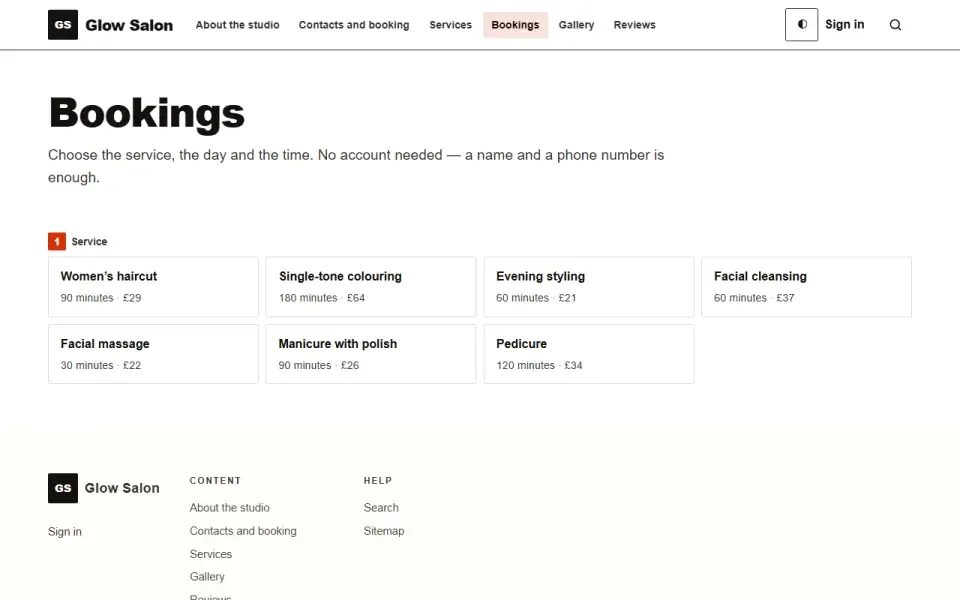
Visitors book on their own: service, day, time, name and phone — no account needed. Free slots are calculated from working hours and existing bookings, and no two people can take the same slot.
Features
- Step-by-step booking: service, day, time, who is coming. If there is only one service, the first step is skipped. The page works without scripts.
- Free slots are calculated automatically — from working hours by weekday, the service's duration, closed days and existing bookings.
- A slot is checked both when shown and when booked; if someone took it while the person was filling in the form, they will see “This time has just been taken”. A database constraint also prevents double booking.
- From the visitor — a name and a phone number or email, optionally a note. Bot protection, no more than six submissions per ten minutes from one address.
- Emails: to the owner — about a new booking (to the site's mailbox); to the visitor — a confirmation with a cancellation link. Cancelling by the link frees the slot immediately, and the owner gets an email.
- In the admin panel: bookings “Coming up” and “Past” with “waiting”, “confirmed” and “cancelled” statuses, a count of new ones in the menu; services with duration, price in words and language; weekly working hours and closed days with a reason.
- Services are found by the site search — leading straight to choosing a day.
Configuration
In the admin panel: “Settings”, “Bookings” section, “How the booking works” group.- Minutes between the start of one slot and the next — 30.
- How many days ahead one can book — 30.
- How many hours before the visit booking closes — 2; with 0, people can book the nearest slot today.
Permissions
- See the bookings.
- Confirm bookings, edit services and hours.
On the site
/zapis — booking, a “Book a visit” item in the menu and in the sitemap; /zapis/otmena/… — cancellation by the key from the email.Installation and removal
Four tables: services, working hours, closed days and bookings. Installation sets up a Mon–Fri working week from 9:00 to 17:00 so that slots are visible right away. Removing the module with data erases all four.Left out on purpose
A visitor account — registering for a single visit scares off half the bookings — and a list of slots that has to be maintained by hand.Så installerar du
Du har den redan. Panelen → Moduler → aktivera.
Versionshistorik
1.0.0
- Запись на приём без учётной записи: услуга, день, время, имя и телефон или почта
- Свободные окна считаются из часов работы, длительности услуги, закрытых дней и уже сделанных записей
- Запрет на двойную запись одного окна в базе; отмена по ссылке из письма освобождает окно
- Письма владельцу и посетителю; в панели — записи, услуги, часы работы и закрытые дни
- Позже в этой же версии: услуги находятся поиском по сайту, дни недели переведены, у полей времени появились подписи, раздел занял своё место в перестроенном меню панели
Frågor och upptäckter tas upp på forumet: kategorin Moduler