Private messages
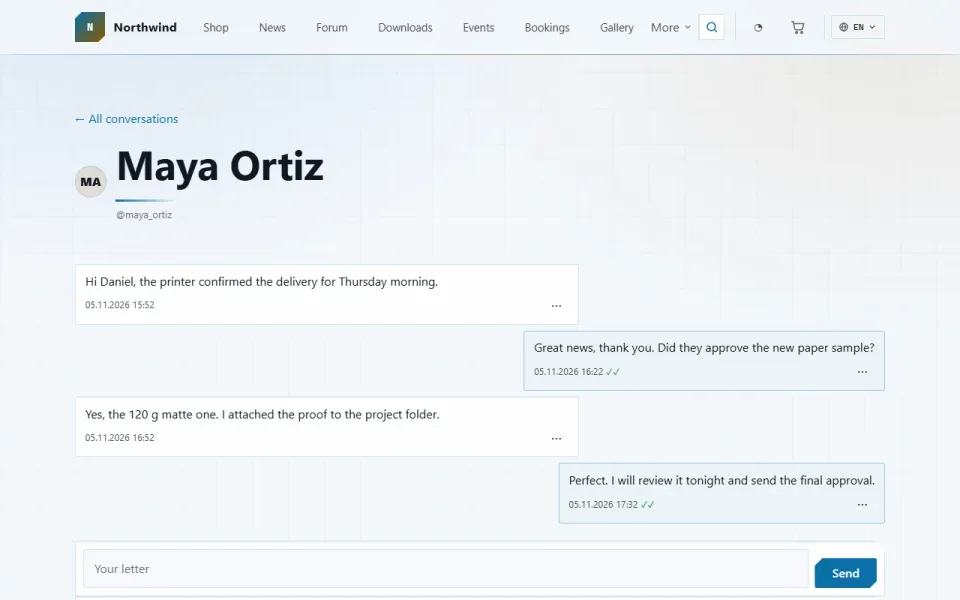
Correspondence between registered people: a list of conversations, a thread with each person and an unread counter. Anyone can close their inbox or stop accepting letters from one specific person.
Features
- A list of conversations and a thread with each person; the thread address is the person's username: /messages/ivanov.
- A “Write” button on a person's page — shown only if the letter can actually be delivered.
- Read receipts and an unread counter on the “Messages” tab in the account area.
- Anyone can close their inbox or stop accepting letters from one person. In both cases the sender sees the same response.
- “Remove the conversation” removes it only for you: the other person keeps the thread. A letter is deleted for good once both sides have removed it.
- The new-letter notification carries no text — only the fact that a letter has arrived.
- In the admin panel: a list of letters with search and a read/unread filter, moving letters to the shared bin one by one or in bulk.
Configuration
Admin panel → Settings → Private messages:- Letter length limit — from 200 to 20,000 characters, 5000 by default.
- Letters per hour from one person — from 1 to 500, 30 by default.
- The site staff can always be written to — anyone with admin panel access can reach even people who have closed their inbox. On by default.
- Notify about new letters — on by default.
Permissions
- Write private messages — granted on installation to members, moderators, editors and administrators.
- View private messages in admin — administrator only.
- Delete private messages and manage their trash — administrator only.
On the site
The /messages section is available to signed-in users only. It does not appear in the site's section bar: its menu item is marked as personal and shows up as a tab in the account area. In the admin panel, the “Messages” section sits in the “Community” group.Installation and removal
Installation creates the messages table and assigns permissions. Disabling the module removes the section but leaves the letters intact. Removing it with data deletes the letters table, the permissions and the module settings.How to install
You already have it. Panel → Modules → enable.
Version history
1.1.0
- “Messages” section in the admin panel: a list of letters, search, a read/unread filter
- Selecting letters and “Select all on this page”, moving to the bin in bulk
- Letters are connected to the engine's shared bin: restore and permanent deletion
- Two new permissions: viewing letters in the admin panel, and deleting with bin management (administrator only by default)
- Reinstalling the module no longer trips over the already added bin column
- The conversation list opens inside the account area with its row of tabs; the menu item became personal and left the section bar
- Later in this version: settings grouped, labels translated into four more languages
1.0.0
- Private messages between registered people: a list of conversations and a thread with each
- “Messages” tab in the account area with an unread counter
- “Write” button on a person's page
- Closed inbox and blocking one person; the sender gets the same response in both cases
- Removal is per person: a conversation removed by one side stays with the other
- Letter notification without its text; limits on letter length and letters per hour
Questions and findings go to the forum: the Modules section