Read also
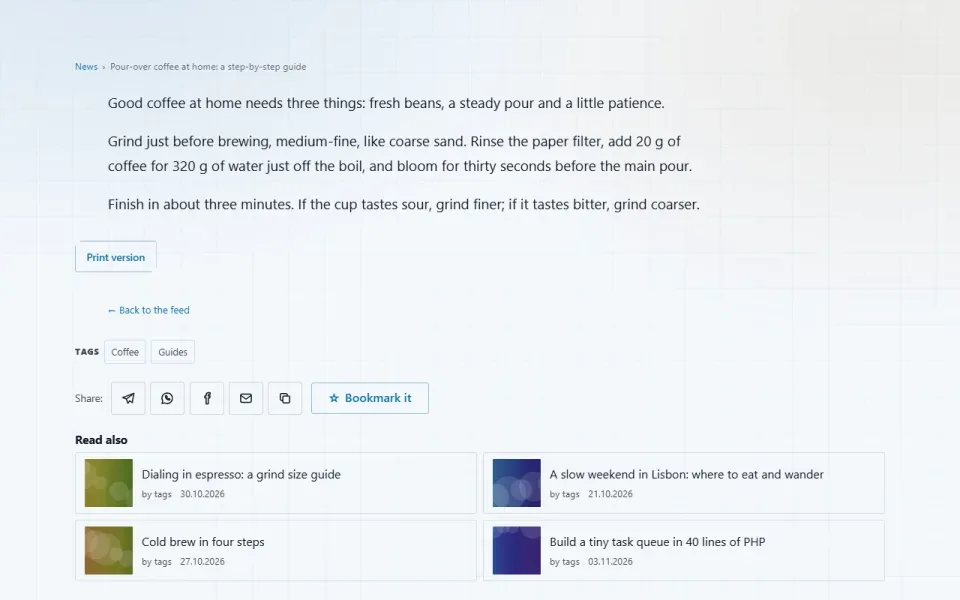
A few related entries under each article — the ones that share the most tags with it. Works wherever tags are used: news, pages, products.
Features
- Shows a “Read also” block under an entry — a list of related entries with links.
- Similarity is counted simply: how many tags match. Entries with more shared tags come first; on a tie, the newer ones.
- The module knows nothing about news, pages or products. It reads the shared tag table, where every tagged entry already has its title and address. That is why the block appears right away under everything that is tagged.
- Shows only entries in the reader's language or with no language: a Russian news item will not list its own English translation.
- The entry itself is never listed; entries without an address are skipped.
- If there is nothing related, there is no block at all — no empty frame on the page.
- A page can opt out of the block.
Configuration
In the admin panel: “Settings”, “Read also” section, “Related entries” group.- How many to show — 4 by default, from 2 to 8.
Permissions
The module has no permissions of its own.On the site
No pages of its own. The block sits in the “Below the content” slot — after the share buttons, if present, and before the discussion. You can move or remove it in “Appearance”, the “Home & blocks” part.Installation and removal
Requires the “Tags” module (tags): without it the module will not turn on. It has no tables of its own, so removing it erases nothing.Left out on purpose
Tag weights and other clever formulas: deciding which tag matters more is guesswork, and guesswork cannot be verified here. Two shared tags beat one — that is enough.How to install
You already have it. Panel → Modules → enable.
Version history
1.0.0
- “Read also” block under an entry: related entries ranked by the number of shared tags
- Works with any tagged entries through the shared tag table, with no changes to other modules
- Shows only entries in the reader's language or with no language
- Setting for the number of entries in the block, from 2 to 8
Questions and findings go to the forum: the Modules section